

Series Context
This article is the fourth article of Phase 4 in an extensive DevOps series designed to take readers from beginner to expert level.
The entire series is structured into four progressive phases to help learners develop mastery in cloud computing and DevOps practices:
- Phase 1 — Foundations (Cloud & DevOps Basics)
- Phase 2 — Cloud Practitioner (Getting Hands-On with Cloud & Containers)
- Phase 3 — DevOps Engineer Path (CI/CD, Infrastructure as Code, Monitoring)
- Phase 4 — Specialization (Advanced Cloud & DevOps Concepts)
This article is the 24th entry in the series overall and focuses on one of the most crucial, yet often overlooked, aspects of modern DevOps workflows, integrating security seamlessly into the CI/CD pipeline through a methodology known as DevSecOps.
Introduction
DevSecOps is a modern evolution of DevOps that integrates security as a core component of the software delivery lifecycle, rather than treating it as a final checkpoint before production.
The term is a blend of Development, Security, and Operations, and it reflects the principle that security is a shared responsibility across the entire DevOps team, not just the security specialists.
At its core, DevSecOps is rooted in the philosophy of "shifting security left".
This means embedding security measures as early as possible in the software development process, starting from planning, through coding and testing, all the way to deployment and operations.
Instead of patching vulnerabilities after the product is built, DevSecOps emphasizes proactive threat identification, real-time mitigation, and continuous hardening of applications and infrastructure.
Key characteristics of DevSecOps include:
- Automated security checks and scans in CI/CD pipelines
- Security-as-Code and policy-driven controls
- Developer enablement through secure coding practices
- Rapid feedback loops that alert teams to issues early
- Collaborative workflows between Dev, Sec, and Ops
In today's threat landscape, where software delivery speed is paramount, DevSecOps ensures that velocity and security can co-exist without compromise.
Why Security Can't Be an Afterthought
In traditional software development, security has often been an isolated phase performed near the end of the development cycle, usually just before release or post-deployment.
This outdated model is no longer viable. Modern threats are more sophisticated, regulations more stringent, and the consequences of insecure pipelines more devastating.
Here's why security must be treated as a first-class citizen in DevOps practices:
1. Rising Cyber Threats
- Attack vectors have increased with the adoption of microservices, containers, and distributed systems.
- CI/CD pipelines themselves are increasingly targeted — from dependency poisoning to secrets leakage.
- Without embedded security, every fast deployment can become a potential breach opportunity.
2. Regulatory Compliance Requirements
- Frameworks such as GDPR, HIPAA, PCI-DSS, and ISO 27001 demand secure software delivery processes.
- Continuous compliance requires traceable, auditable, and enforceable security controls.
- Late-stage security audits often result in missed deadlines and non-compliance penalties.
3. Real-World Breach Examples
- SolarWinds Supply Chain Attack: Malicious code injected into the build process affected thousands of organizations.
- Codecov Bash Uploader Breach: Compromised CI tool led to secrets and environment variables being leaked.
- Uber (2016): Poorly protected credentials in a CI repository led to a breach of 57 million user records.
Each of these examples reinforces the importance of embedding security into every layer of the DevOps pipeline.
Purpose of the Guide
This article is crafted to serve as a comprehensive, hands-on guide for software engineers, DevOps practitioners, and IT security teams seeking to incorporate robust security practices into their CI/CD workflows.
Specifically, it aims to:
- Equip teams with practical strategies to detect and eliminate vulnerabilities early in the software lifecycle
- Introduce key tools and automation techniques that enable security integration without disrupting development velocity
- Foster a security-first mindset across development, operations, and security teams
- Bridge the gap between traditional security practices and modern DevOps principles
Whether you are building your first CI/CD pipeline or scaling enterprise-grade DevOps workflows, this guide will show you how to infuse security at every step, making your software faster to release and safer to use.
Table of Contents
· Series Context · Introduction · Why Security Can't Be an Afterthought ∘ 1. Rising Cyber Threats ∘ 2. Regulatory Compliance Requirements ∘ 3. Real-World Breach Examples · Purpose of the Guide · Table of Contents · Core Principles of DevSecOps · Shift Left Strategy ∘ What It Means ∘ Why It Reduces Cost and Risk ∘ Static Analysis in Code · Automation ∘ What It Means ∘ Benefits of Automation ∘ Examples of Automation in Practice · Collaboration ∘ What It Means ∘ How to Promote Collaboration ∘ Joint Policy as Code · Continuous Monitoring ∘ What It Means ∘ Why Continuous Monitoring Matters ∘ Runtime Security with Falco ∘ Tooling Options · In Summary · Security Challenges in Traditional CI/CD · Lack of Early Detection of Vulnerabilities ∘ What Happens ∘ Why It's Dangerous ∘ Missing Static Analysis ∘ Fix · Manual Security Reviews ∘ What Happens ∘ Why It's Dangerous ∘ Review Fatigue ∘ Fix · Insecure Dependencies in Build Artifacts ∘ What Happens ∘ Why It's Dangerous ∘ Vulnerable Package Detected by Snyk ∘ Fix · Secrets and Credential Leaks ∘ What Happens ∘ Why It's Dangerous ∘ Secret in .env file pushed to Git ∘ Fix · Insecure Deployment Environments (e.g., misconfigured cloud services) ∘ What Happens ∘ Why It's Dangerous ∘ Examples of Misconfigurations ∘ Fix · Summary Table: Traditional CI/CD Security Gaps · Key Stages of CI/CD with Embedded Security Controls · Planning and Design ∘ 1. Threat Modeling During Sprint Planning ∘ Example Process ∘ Tooling ∘ 2. Secure Architecture Design Reviews ∘ 3. Define Security Acceptance Criteria in User Stories · Code and Build Stage ∘ 1. Static Application Security Testing (SAST) ∘ 2. Enforce Code Signing and Commit Policies ∘ 3. Secure Secrets Management · Dependency and Package Management ∘ 1. Software Composition Analysis (SCA) ∘ 2. License and CVE Scanning · Test Stage ∘ 1. Dynamic Application Security Testing (DAST) ∘ 2. Security Unit and Integration Tests ∘ 3. Fuzz Testing for APIs and Services · Release Stage ∘ 1. Artifact Scanning ∘ 2. Container Image Scanning ∘ 3. Automated Policy Gates · Deploy and Operate ∘ 1. Infrastructure as Code (IaC) Security Scanning ∘ 2. Runtime Protection ∘ 3. Continuous Cloud Configuration Scanning · Wrap-Up · Tooling and Automation in DevSecOps · CI/CD Platforms with Security Support ∘ 1. GitHub Actions ∘ 2. GitLab CI/CD ∘ 3. Jenkins ∘ 4. CircleCI · Security Tools Integration Examples ∘ 1. Integrating Snyk in GitHub Actions ∘ 2. Jenkins Pipeline with SonarQube and OWASP ZAP · Security-as-Code ∘ What Is Security-as-Code? ∘ 1. Sentinel Policy for Terraform (HashiCorp) ∘ 2. OPA Policy for Kubernetes ∘ 3. Secret Detection Rules in YAML ∘ Benefits of Security-as-Code · Closing · DevSecOps in Practice: Sample Pipeline Architecture · Narrative: Visual Layout of a Secure CI/CD Pipeline · Example YAML Pipeline with Security Steps (GitHub Actions) · Jenkinsfile Alternative Example · Explanation of Each Security Gate and Checkpoint · Best Practices for Real-World Pipelines · Summary: DevSecOps Pipeline Mindset · Culture and Process Considerations · Developer Security Training ∘ Why It Matters ∘ 1. Secure Coding Practices ∘ 2. Tooling Know-How ∘ 3. Training Approaches · Security Champions ∘ What Is a Security Champion? ∘ Why It Works ∘ Key Responsibilities ∘ How to Appoint and Support Them · Metrics and KPIs ∘ 1. Mean Time to Detect (MTTD) Vulnerabilities ∘ 2. Mean Time to Remediate (MTTR) ∘ 3. Percentage of Builds Passing Security Gates ∘ 4. Code Coverage for Security Tests ∘ 5. False Positive Rate of Scanners ∘ 6. Training Coverage and Frequency · Suggested DevSecOps KPI Dashboard Fields · Bringing Culture and Metrics Together · Regulatory and Compliance Considerations · Mapping Security Steps to Compliance Frameworks ∘ 1. SOC 2 (System and Organization Controls 2) ∘ 2. ISO/IEC 27001 ∘ 3. NIST SP 800–53 / 800–218 (Secure Software Development Framework) ∘ 4. OWASP SAMM (Software Assurance Maturity Model) · Automating Evidence Collection and Audit Trails ∘ 1. Version-Controlled Security Policies ∘ 2. Pipeline Artifacts as Evidence ∘ 3. Centralized Logging and Monitoring ∘ 4. Security Dashboards for Stakeholders ∘ Automated Policy Gates ∘ 6. Scheduled Compliance Scans · DevSecOps as a "Self-Updating Logbook" · Final Thoughts on Compliance in DevSecOps · Challenges and Pitfalls in DevSecOps Adoption · False Positives Slowing Down Pipelines ∘ The Problem ∘ How to Solve It · Tool Overload and Integration Friction ∘ The Problem ∘ How to Solve It · Lack of Alignment Between Security and Development Teams ∘ The Problem ∘ How to Solve It · Strategies to Overcome Resistance ∘ Practical Strategies · Mindset Shift: DevSecOps Is Not About Perfect Security · Summary of Key Pitfalls and Remedies · Case Studies and Success Stories · Netflix — Automating Security at the Speed of Streaming ∘ Challenge ∘ DevSecOps Approach ∘ Results · Capital One — Financial Security at Cloud Scale ∘ Challenge ∘ DevSecOps Approach ∘ Results ∘ Metrics · Adobe — Secure Delivery in a SaaS-Heavy Ecosystem ∘ Challenge ∘ DevSecOps Approach ∘ Results · Shopify — Preventing Supply Chain Attacks at the Source ∘ Challenge ∘ DevSecOps Approach ∘ Results · Healthcare.gov — Compliance-Driven DevSecOps ∘ Challenge ∘ DevSecOps Approach ∘ Results · Cross-Company Observations · What These Successes Teach Us · DevSecOps as a "Seatbelt in a Race Car" · Future of DevSecOps · AI/ML-based Security in Pipelines ∘ Why It Matters ∘ Use Cases and Capabilities ∘ Examples in Practice ∘ Challenges to Watch · Unified DevOps + SecOps Observability Platforms ∘ The Problem Today ∘ The Emerging Solution: Unified Observability ∘ Platform Trends ∘ Examples of Emerging Tools ∘ What This Enables · Zero Trust CI/CD ∘ Zero Trust 101 ∘ Why CI/CD Needs Zero Trust ∘ Key Components of Zero Trust in CI/CD ∘ Tooling Trends ∘ ∘ Benefits of Zero Trust Pipelines · In Summary: The DevSecOps of Tomorrow · How to Prepare Now · Conclusion: Building a Culture of Secure Innovation · 1. Recap: Security Is a Shared Responsibility · 2. Encourage Immediate Small Wins ∘ ✅ Integrate Static Application Security Testing (SAST) ∘ ✅ Add Software Composition Analysis (SCA) ∘ ✅ Set up Secrets Detection ∘ ✅ Harden Infrastructure-as-Code (IaC) ∘ ✅ Establish Security Champions · 3. Build Gradually Toward Full-Stack DevSecOps Maturity ∘ 🔹R Beginer Maturity Stage ∘ 🔹R Interediate Maturity Stage ∘ 🔹R Advaned Maturity Stage · 4. Final Words: Secure, Ship, Scale, Without Compromise · Additional Resources · Frameworks and Maturity Models ∘ 1. OWASP DevSecOps Maturity Model (DSOMM) ∘ 2. Software Assurance Maturity Model (SAMM) by OWASP · Hands-On Labs and Training Platforms ∘ 1. Katacoda (by O'Reilly) ∘ 2. Secure Code Warrior ∘ 3. Play With Docker / Play With Kubernetes · Books for Deep Understanding ∘ 1. The DevOps Handbook ∘ 2. Securing DevOps: Security in the Cloud ∘ 3. Building a Modern Security Program · DevSecOps Communities and Collaboration Hubs ∘ 1. DevSecOps.org ∘ 2. OWASP Slack Community ∘ 3. Reddit: r/devsecops & r/devops ∘ 4. Discord: DevSecOps Foundation · Bonus: Tools for Your DevSecOps Toolbox · Final Thought
Core Principles of DevSecOps
At the heart of DevSecOps is the mission to build software that is both rapidly deployable and inherently secure.
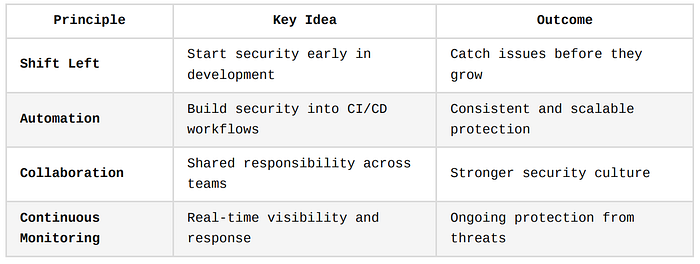
To achieve this balance, DevSecOps is guided by four key principles: Shift Left, Automation, Collaboration, and Continuous Monitoring.
Let's unpack each of these in detail.
Shift Left Strategy
What It Means
The "Shift Left" principle refers to moving security activities earlier in the software development lifecycle (SDLC), as far left as the planning and coding phases.
Traditionally, security testing occurred at the far right of the process, during staging or post-deployment, where fixing issues is more expensive and disruptive.
In contrast, shifting left means running security checks as soon as code is written, thereby catching vulnerabilities early.
Think of a car manufacturer. If a faulty brake system is discovered after the cars are shipped to dealers, the recall costs will be massive. But if the problem is detected on the assembly line, it's cheaper and easier to fix. Similarly, fixing a vulnerability after deployment is costlier than fixing it during coding.
Why It Reduces Cost and Risk
- Reduced Cost of Remediation: According to IBM, fixing a bug during the design phase might cost $100. The same bug, if discovered after release, could cost over $10,000.
- Faster Delivery: Fixing bugs early avoids bottlenecks and rework in later stages.
- Security by Design: It helps developers think about secure architecture from the start.
Static Analysis in Code
You can integrate a Static Application Security Testing (SAST) tool into your developer workflow:
# Example: Running Snyk or SonarQube CLI in a GitHub Actions pipeline

jobs:
  security-check:
    runs-on: ubuntu-latest
    steps:
      - uses: actions/checkout@v3
      - name: Run Snyk to check for vulnerabilities
        uses: snyk/actions/node@master
        with:
          command: test
This runs security scans immediately after code is pushed, enabling rapid feedback.
Automation
What It Means
Automation in DevSecOps is about embedding security checks directly into the CI/CD pipeline so that code is automatically tested for vulnerabilities, misconfigurations, and policy violations without needing manual intervention.
Imagine a bakery with a conveyor belt. As cakes move down the line, machines automatically check for size, shape, and icing consistency. Any imperfect cake is instantly flagged. Similarly, automated security scans ensure only "safe" code proceeds to the next pipeline stage.
Benefits of Automation
- Scalability: Can handle hundreds of commits and releases without slowing down.
- Consistency: Eliminates human error from manual reviews.
- Speed: Fast feedback loops enable developers to fix issues before merging.
Examples of Automation in Practice
- SAST + SCA Integration
- Automatically run tools like Bandit (for Python), Brakeman (for Rails), or Trivy (for container scanning) as part of CI/CD.
2. Infrastructure as Code (IaC) Scanning
# Example: Checkov for Terraform security scanning in a GitHub Action

- name: Scan Terraform files with Checkov
  uses: bridgecrewio/checkov-action@master
  with:
    directory: ./terraform
This helps you enforce compliance and best practices in your infrastructure before it gets deployed.
Collaboration
What It Means
DevSecOps breaks down traditional silos between development, security, and operations teams.
Instead of security being the job of a separate department, all teams share responsibility and work together from the start.
Imagine building a skyscraper. The architect (developer), the safety engineer (security), and the construction manager (operations) must collaborate from day one. If the safety engineer shows up only after the building is complete, the entire project might be unsafe or need to be torn down.
How to Promote Collaboration
- Security Champions Program: Appoint developers as team liaisons for security practices.
- Shared Visibility: Use dashboards (like Grafana or Datadog) that all teams can monitor.
- Joint Backlog Grooming: Security tasks are added to sprint planning, not handled separately.
Joint Policy as Code
# Example: Sentinel policy for Terraform — all S3 buckets must be encrypted
policy "s3-encryption" {
  source = "./policies/s3_encryption.sentinel"
  enforcement_level = "hard-mandatory"
}
Security creates the policy, Dev implements it, Ops enforces it, that's collaborative governance.
Continuous Monitoring
What It Means
Even after secure deployment, systems must be continuously monitored for anomalies, vulnerabilities, and compliance violations.
Security is not a "set and forget" activity — new threats emerge constantly.
Think of a home alarm system. Installing locks is good, but you also need motion detectors, cameras, and alert systems that keep working 24/7 to detect intrusions. Similarly, modern software needs constant runtime security.
Why Continuous Monitoring Matters
- Detects new threats in real-time
- Ensures cloud infrastructure remains compliant
- Alerts on suspicious behavior or traffic anomalies
Runtime Security with Falco
# Falco Rule Example: Detect shell in a container
- rule: Terminal shell in container
  desc: Detects when a shell is run inside a container
  condition: container and shell_procs
  output: "Shell running in container (user=%user.name command=%proc.cmdline)"
  priority: WARNING
You can stream alerts to Slack, email, or dashboards for visibility.
Tooling Options
- SIEMs: Splunk, ELK Stack
- Cloud-Native Monitoring: AWS GuardDuty, Azure Defender
- Container Monitoring: Falco, Sysdig Secure, Aqua Trivy (runtime)
In Summary
Security Challenges in Traditional CI/CD
Traditional CI/CD pipelines were primarily designed with speed, automation, and deployment efficiency in mind.
However, security was often bolted on at the end, or worse, overlooked completely.
This has led to systemic vulnerabilities and exposure points throughout the delivery lifecycle.
In this section, we'll explore the core security challenges in traditional CI/CD workflows and break down why each one poses a significant threat, complete with analogies and relevant code or YAML snippets where applicable.
Lack of Early Detection of Vulnerabilities
What Happens
In traditional setups, vulnerabilities are often detected late in the release cycle, sometimes only during staging, UAT, or even post-deployment.
By then, developers have moved on to other tasks, and fixing bugs becomes more difficult, expensive, and time-consuming.
Why It's Dangerous
- Vulnerabilities can be pushed to production undetected.
- Late detection causes delays and technical debt.
- Attackers may exploit flaws long before they're discovered.
It's like discovering a crack in a building's foundation after construction is complete.
You now have to tear down walls or halt usage to fix something that could've been addressed during groundwork.
Missing Static Analysis
Without Static Application Security Testing (SAST) early in the pipeline, the following insecure Python code might go unnoticed:
# Vulnerable: Hardcoded SQL without parameterization
user_input = input("Enter your username: ")
query = f"SELECT * FROM users WHERE username = '{user_input}'"
A SAST tool like Bandit or SonarQube could have flagged this as a SQL Injection risk during the first commit.
Fix
Introduce SAST early:
# GitHub Actions - Bandit SAST scan
jobs:
  bandit-scan:
    runs-on: ubuntu-latest
    steps:
      - uses: actions/checkout@v2
      - name: Run Bandit
        run: bandit -r .
Manual Security Reviews
What Happens
In legacy DevOps practices, security is often performed by a separate team conducting manual code reviews or compliance checks after development is complete.
These reviews are not only time-consuming, but they can also miss fast-moving changes in agile sprints or rapid-release pipelines.
Why It's Dangerous
- Scalability issues in large teams with many commits per day.
- Security becomes a bottleneck that slows releases.
- Often inconsistent — different reviewers catch different things.
It's like having a single airport security agent manually inspect every bag on an international flight — they'll get overwhelmed, miss items, and cause delays.
Review Fatigue
{
  "id": "123",
  "name": "admin",
  "password": "admin123" // reviewer might overlook this
}
In a 50-file pull request, hardcoded secrets like this can easily go unnoticed without automation.
Fix
Use automated pull request scanners like:
- GitGuardian for secrets
- SonarCloud for code quality and security
- Codacy for automated security linting
GitHub pre-merge check
jobs:
  security-review:
    steps:
      - name: GitGuardian Secret Scan
        uses: GitGuardian/ggshield-action@v1
Insecure Dependencies in Build Artifacts
What Happens
Applications often depend on third-party packages, open-source libraries, or container images.
Without automated vetting, vulnerable or outdated dependencies may get included in the final build and silently introduce attack vectors.
Why It's Dangerous
- Attackers target popular open-source libraries for supply chain attacks.
- Developers may unknowingly use packages with known CVEs (Common Vulnerabilities and Exposures).
- Version drift leads to inconsistency across environments.
It's like building a fortress with imported bricks from an unknown source, some of them might be hollow, weak, or filled with termites.
Vulnerable Package Detected by Snyk
"dependencies": {
  "lodash": "4.17.15"
}
This version of Lodash has multiple critical vulnerabilities. Without SCA (Software Composition Analysis), this could go live.
Fix
Integrate SCA tools like:
- Snyk
- OWASP Dependency-Check
- Dependabot
Snyk in GitHub Action
- name: Snyk SCA Scan
  uses: snyk/actions/node@master
  with:
    command: test
Secrets and Credential Leaks
What Happens
Sensitive information, such as API keys, database credentials, or cloud tokens, are often hardcoded or committed into version control accidentally.
These secrets become available to anyone with repo access, and in some cases, even to the public if exposed on GitHub.
Why It's Dangerous
- Leaked secrets can lead to full system compromise.
- Attackers use scanners to monitor public GitHub commits in real-time.
- Revoking, rotating, and fixing leaked secrets is complex and disruptive.
It's like accidentally posting your house keys and address on social media, and then forgetting you did.
Secret in .env file pushed to Git
AWS_SECRET_ACCESS_KEY=AKIAIOSFODNN7EXAMPLEOnce pushed, even deleting the file does not remove it from Git history.
Fix
- Use tools like GitGuardian, Talisman, or TruffleHog to detect secrets.
- Use secret management solutions like HashiCorp Vault, AWS Secrets Manager, or Doppler.
- Block pushes that contain secrets using Git hooks:
# Pre-commit hook example with detect-secrets
detect-secrets-hook --baseline .secrets.baseline
Insecure Deployment Environments (e.g., misconfigured cloud services)
What Happens
Once code passes CI/CD, it is deployed to production or staging. If the target environment is misconfigured e.g., open S3 buckets, permissive IAM roles, or unencrypted storage, then even secure code becomes vulnerable.
Why It's Dangerous
- Cloud misconfigurations are among the leading causes of breaches.
- Over-permissioned roles can lead to privilege escalation.
- Attackers actively scan the internet for exposed services and misconfigurations.
Deploying a secure app on a misconfigured cloud service is like locking your front door but leaving the back door wide open.
Examples of Misconfigurations
- S3 bucket with public read access
{
  "Effect": "Allow",
  "Principal": "*",
  "Action": "s3:GetObject",
  "Resource": "arn:aws:s3:::example-bucket/*"
}
2. EC2 Instance with SSH open to the world
# Security group open to 0.0.0.0/0 on port 22Fix
- Use Infrastructure-as-Code (IaC) scanning to detect misconfigurations early.
- Examples: Checkov, tfsec, Kics, CloudSploit
- Enforce policies using tools like Open Policy Agent (OPA) and Sentinel.
# Checkov GitHub Action for Terraform
- name: IaC Security Scan
  uses: bridgecrewio/checkov-action@master
  with:
    directory: ./terraform
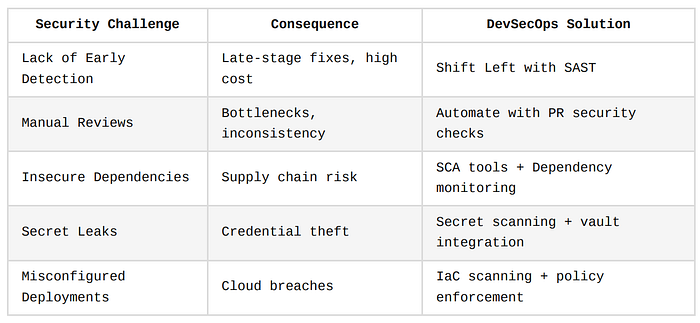
Summary Table: Traditional CI/CD Security Gaps
Key Stages of CI/CD with Embedded Security Controls
Integrating security into the CI/CD pipeline means embedding security controls at every stage of the software development lifecycle (SDLC), from planning to deployment.
The goal is to build secure software by default, not as an afterthought.
Let's break down how security can be embedded across the six key stages of CI/CD.
Planning and Design
This is where security should begin, before a single line of code is written.
Security in planning ensures the architecture is resilient, the risks are known, and requirements are clear.
1. Threat Modeling During Sprint Planning
Threat modeling is the process of identifying and assessing potential threats to a system's design before development starts.
It's like creating a home blueprint with an architect while also working with a security consultant to identify where to place motion sensors, CCTV, and safes.
Example Process
- Identify application components and data flows
- Ask: What could go wrong? (STRIDE model: Spoofing, Tampering, Repudiation, Information Disclosure, Denial of Service, Elevation of Privilege)
- Prioritize threats and mitigation strategies
Tooling
- Microsoft Threat Modeling Tool
- OWASP Threat Dragon
2. Secure Architecture Design Reviews
Architecture reviews ensure that the system's design aligns with security best practices, such as network segmentation, zero trust, encryption, and access control.
Checklist Includes:
- Are APIs protected with proper authentication?
- Is sensitive data encrypted at rest and in transit?
- Are third-party services validated and isolated?
3. Define Security Acceptance Criteria in User Stories
Each user story or feature should include security-focused acceptance criteria, e.g., "All sensitive fields must be encrypted before storage," or "This feature must enforce role-based access."
Example
**User Story**: As a user, I want to update my profile.

**Acceptance Criteria**:
- Input fields must be validated server-side.
- Only authenticated users can access the update endpoint.
- Audit logs must record changes to personal data.
Code and Build Stage
This is where developers write and commit code.
Embedding security here means enabling fast feedback through automated static checks and secure practices.
1. Static Application Security Testing (SAST)
SAST tools analyze code for security flaws without running the application.
This helps detect issues like SQL injection, buffer overflows, and hardcoded secrets.
It's like running a grammar check on a document — the code is scanned line by line to find security "mistakes."
SonarQube in a GitHub Action
- name: Run SonarQube Scan
  uses: sonarsource/[email protected]
  with:
    projectBaseDir: './src'
    args: >
      -Dsonar.projectKey=myapp
Other Tools: Fortify, Checkmarx, CodeQL (GitHub)
2. Enforce Code Signing and Commit Policies
Digitally signing code and commits ensures authenticity and integrity. Only trusted contributors should be allowed to push changes.
It's like sealing a letter with a wax stamp, anyone can see if it's been tampered with.
Enforce GPG Signed Commits in Git
git config --global commit.gpgsign trueGitHub Enforcement
Enable branch protection: "Require signed commits"
3. Secure Secrets Management
Secrets such as API keys or database credentials must never be hardcoded or stored in Git.
They should be managed using a centralized secrets manager.
Tools:
- HashiCorp Vault
- Doppler
- AWS Secrets Manager
Use AWS Secrets Manager in Code (Python)
import boto3

client = boto3.client('secretsmanager')
secret = client.get_secret_value(SecretId='MyAppSecret')
db_password = secret['SecretString']
Dependency and Package Management
Most modern apps rely on hundreds of third-party packages.
These dependencies must be continuously scanned and verified.
1. Software Composition Analysis (SCA)
SCA tools scan your dependencies for known vulnerabilities, outdated libraries, and license violations.
If you're baking a cake, it's not just about your recipe, it's about checking that the ingredients aren't expired or toxic.
Tools
- Snyk
- Black Duck
- OWASP Dependency-Check
GitHub Action for Snyk
- name: Snyk SCA Scan
  uses: snyk/actions/node@master
  env:
    SNYK_TOKEN: ${{ secrets.SNYK_TOKEN }}
2. License and CVE Scanning
SCA tools also help check if you're using dependencies with license restrictions or high-severity CVEs (Common Vulnerabilities and Exposures).
Example CVE Output (Snyk)
✗ High severity vulnerability found in [email protected]
  - CVE-2021-44906: Prototype Pollution
Test Stage
This is where dynamic testing and specialized security testing are performed in staging or test environments.
1. Dynamic Application Security Testing (DAST)
DAST tools simulate attacks against a running application to uncover vulnerabilities such as XSS, CSRF, and broken authentication.
It's like hiring a locksmith to try to break into your building while it's operating.
Tools: OWASP ZAP, Burp Suite, StackHawk Example: OWASP ZAP in Docker
docker run -t owasp/zap2docker-stable zap-baseline.py -t https://yourapp.com2. Security Unit and Integration Tests
Alongside functional tests, developers should write tests to validate security behavior, such as checking that a role cannot access restricted endpoints.
Test Unauthorized Access (Jest + Supertest)
test('Unauthorized user cannot access admin', async () => {
  const res = await request(app).get('/admin')
  expect(res.statusCode).toBe(403)
})
3. Fuzz Testing for APIs and Services
Fuzzing is an advanced technique that throws malformed, unexpected, or random inputs at your API to find hidden bugs or crash points.
Release Stage
This stage ensures the final artifacts are secure and validated before they are released to production or customers.
1. Artifact Scanning
Scan build artifacts (e.g., JARs, Docker images) before publishing to verify they contain no known vulnerabilities.
Tools: Trivy, Clair, Anchore Example: Docker Image Scan with Trivy
trivy image myapp:latest2. Container Image Scanning
Every container image should be scanned for:
- Vulnerable base layers (e.g., Alpine, Debian)
- Embedded secrets
- Unsafe binaries
3. Automated Policy Gates
Establish automated gates in your CI/CD pipeline that block releases with high-risk vulnerabilities.
GitLab CI/CD
script:
  - trivy image myapp:latest
  - if [ $? -ne 0 ]; then exit 1; fi
Deploy and Operate
This final stage ensures the deployed application and its infrastructure are continuously monitored and hardened.
1. Infrastructure as Code (IaC) Security Scanning
Scan Terraform, CloudFormation, or Helm charts for misconfigurations before deploying.
Tools: tfsec, Checkov, Kics Example: Checkov GitHub Action
- name: Run Checkov Scan
  uses: bridgecrewio/checkov-action@master
  with:
    directory: ./terraform
2. Runtime Protection
Use Runtime Application Self-Protection (RASP), Web Application Firewalls (WAFs), and container security agents to protect applications in production.
Tools: Aqua Security, Datadog RASP, AWS WAF
3. Continuous Cloud Configuration Scanning
Monitor your cloud accounts for drift or misconfigurations.
Tools: Prisma Cloud, AWS Config, Azure Defender Example: AWS Config Rule
{
  "ConfigRuleName": "s3-bucket-encryption-enabled",
  "SourceIdentifier": "S3_BUCKET_SERVER_SIDE_ENCRYPTION_ENABLED"
}
Wrap-Up
Security isn't a one-time task, it's a thread that runs through every stage of the pipeline.
Embedding these practices ensures that security becomes invisible but ever-present, empowering teams to deploy faster without increasing risk.
Tooling and Automation in DevSecOps
Automation is the engine room of DevSecOps. It enables teams to embed security checks into development pipelines, ensuring that vulnerabilities are caught before they ever reach production, and without slowing down delivery.
This section walks you through how to leverage popular CI/CD platforms, integrate powerful security tools, and adopt the Security-as-Code approach for scalable, repeatable protection.
CI/CD Platforms with Security Support
The success of DevSecOps hinges on how well your CI/CD platform supports security tool integration.
Fortunately, most modern platforms support native or plug-and-play security scanners.
1. GitHub Actions
GitHub Actions offers deep integration with SAST, SCA, container scanning, and secrets detection tools.
You can automate these steps using workflows triggered by events such as push, pull_request, or release.
Think of GitHub Actions as your automated assembly line — every commit goes through a conveyor belt with multiple scanners inspecting it in real-time.
Security Workflow with Snyk
name: Snyk Vulnerability Scan

on: [push, pull_request]

jobs:
  security:
    runs-on: ubuntu-latest
    steps:
      - name: Checkout repository
        uses: actions/checkout@v3

      - name: Run Snyk to check vulnerabilities
        uses: snyk/actions/node@master
        env:
          SNYK_TOKEN: ${{ secrets.SNYK_TOKEN }}
        with:
          command: test
2. GitLab CI/CD
GitLab provides built-in DevSecOps features out of the box:
- SAST and DAST templates
- Container scanning
- Dependency scanning
- License compliance
GitLab SAST Job
sast:
  stage: test
  script:
    - /analyzer run
  artifacts:
    paths: [gl-sast-report.json]
GitLab also auto-generates security dashboards from your pipeline jobs.
3. Jenkins
Jenkins is highly customizable through plugins like:
- SonarQube Scanner
- OWASP Dependency-Check Plugin
- Trivy Scan Plugin
- Git Secrets Scanner
However, Jenkins requires manual configuration for most security steps.
4. CircleCI
CircleCI integrates with Snyk, Aqua, Anchore, and other tools using custom orbs (CircleCI reusable packages).
CircleCI Orb with Snyk
version: 2.1

orbs:
  snyk: snyk/[email protected]

jobs:
  security_scan:
    docker:
      - image: cimg/node:18.0
    steps:
      - checkout
      - snyk/scan
Security Tools Integration Examples
Let's look at real-world examples of integrating popular security tools into your pipeline:
1. Integrating Snyk in GitHub Actions
Use case: Check Node.js project for known vulnerabilities and insecure licenses.
Why Snyk?
- Performs SCA (Software Composition Analysis).
- Checks for known vulnerabilities in dependencies.
- Provides fix suggestions.
Step-by-Step Setup:
- Get a Snyk API token from https://snyk.io.
- Save it as a secret in your GitHub repo:
SNYK_TOKEN. - Add the GitHub Action workflow (see above).
Expected Output
On PR or push, the action scans your dependencies and fails the pipeline if high-severity issues are found.
2. Jenkins Pipeline with SonarQube and OWASP ZAP
Use case: Perform code quality scanning with SonarQube and DAST (Dynamic Application Security Testing) with OWASP ZAP.
Jenkinsfile Example
pipeline {
    agent any

    stages {
        stage('Checkout') {
            steps {
                git url: 'https://github.com/your-repo.git'
            }
        }

        stage('SonarQube Analysis') {
            steps {
                withSonarQubeEnv('SonarQubeServer') {
                    sh 'mvn sonar:sonar'
                }
            }
        }

        stage('ZAP DAST Scan') {
            steps {
                sh 'docker run -t owasp/zap2docker-stable zap-baseline.py -t http://your-app-url'
            }
        }
    }
}
Outcome
- SonarQube analyzes static code issues like SQL injection or code smells.
- OWASP ZAP simulates real-world attacks on your staging app.
Why This Is Powerful
Both static and dynamic security perspectives are covered in a single pipeline, giving you end-to-end visibility.
Security-as-Code
One of the most powerful advancements in DevSecOps is treating security policies, scans, and checks as code, just like infrastructure and application logic.
What Is Security-as-Code?
It's the practice of expressing security controls in machine-readable and version-controlled files (YAML, JSON, HCL). These controls can be:
- Compliance rules
- Security guardrails
- Access control policies
- Audit and scanning rules
Security-as-Code is like having blueprints for a building's alarm and defense system, they're documented, repeatable, and can be improved collaboratively.
1. Sentinel Policy for Terraform (HashiCorp)
# Prevent provisioning of public S3 buckets
policy "s3-public-access" {
  source = "./policies/s3_public_access.sentinel"
  enforcement_level = "hard-mandatory"
}
What This Does
It blocks infrastructure changes if an S3 bucket is exposed to the public.
2. OPA Policy for Kubernetes
# Deny privileged containers in Kubernetes
package kubernetes.admission

deny[msg] {
  input.request.kind.kind == "Pod"
  container := input.request.object.spec.containers[_]
  container.securityContext.privileged == true
  msg := "Privileged containers are not allowed."
}
Integrated With
- Gatekeeper (OPA controller for Kubernetes)
- Terraform, Helm, and other IaC tools
3. Secret Detection Rules in YAML
rules:
  - description: "AWS Secret Key"
    regex: "AKIA[0-9A-Z]{16}"
    level: high
Used In: Git hooks, GitGuardian, TruffleHog, or custom scripts
Benefits of Security-as-Code
- Auditability: All rules are version-controlled.
- Collaboration: Developers can suggest security changes via pull requests.
- Repeatability: The same security rules apply across teams, environments, and pipelines.
- Scalability: Easily applied across multiple repositories or cloud accounts.
Closing
Tooling and automation are non-negotiable pillars of modern DevSecOps.
With the right CI/CD platform and a well-integrated stack of security tools, organizations can:
- Detect vulnerabilities early
- Reduce manual intervention
- Ensure consistent and repeatable security policies
- Empower developers to own security without slowing down delivery
By adopting Security-as-Code, teams can further enhance their DevSecOps maturity, making security an integral, automated, and enforceable part of their software development lifecycle.
DevSecOps in Practice: Sample Pipeline Architecture
To move beyond theory and blueprints, let's explore what a secure CI/CD pipeline looks like in practice, step by step.
This section includes a visual layout (described narratively), a realistic pipeline configuration, and an explanation of each security gate.
Whether you're using GitHub Actions, GitLab, Jenkins, or CircleCI, the underlying pattern remains the same: security at every stage, executed automatically and enforced continuously.
Narrative: Visual Layout of a Secure CI/CD Pipeline
Since we're not using diagrams, here's a descriptive walkthrough of a secure CI/CD pipeline from DevSecOps perspective.
Imagine this as a sequence of conveyor belts and robotic arms in a high-tech software factory.
- Code Commit (Developer workstation)
- Starts with version-controlled source code in Git
- Git hooks check for secrets, signatures, and linting rules
2. Pre-Build Stage
- SAST (Static Application Security Testing)
- Dependency scanning (SCA)
- Secret scans on codebase and commit history
3. Build Stage
- Build artifacts (binaries, Docker images)
- Artifact scanning for embedded vulnerabilities
4. Test Stage
- Unit and integration tests
- DAST (Dynamic Application Security Testing) on staging environment
- API fuzzing or penetration testing
5. Release Gate
- Infrastructure as Code (IaC) scanned
- Release is blocked if critical issues exist
6. Deployment
- Secure deploy to staging or production via GitOps or Infrastructure-as-Code
- Continuous monitoring and runtime protection activated
7. Post-Deployment
- Security telemetry collected
- Alerts and reports generated
- Compliance audit logs stored
Example YAML Pipeline with Security Steps (GitHub Actions)
Let's look at a simplified yet powerful GitHub Actions workflow for a Node.js web app that applies DevSecOps principles.
name: Secure CI/CD Pipeline

on:
  push:
    branches: [main]
  pull_request:

jobs:
  security-checks:
    name: Run Security Tests
    runs-on: ubuntu-latest

    steps:
      - name: Checkout Code
        uses: actions/checkout@v3

      # Secrets Scan
      - name: GitGuardian Secret Scan
        uses: GitGuardian/ggshield-action@v1

      # Static Application Security Testing
      - name: SAST Scan with CodeQL
        uses: github/codeql-action/init@v2
        with:
          languages: javascript

      - name: Run CodeQL Analysis
        uses: github/codeql-action/analyze@v2

      # Dependency Scanning
      - name: Run Snyk SCA
        uses: snyk/actions/node@master
        env:
          SNYK_TOKEN: ${{ secrets.SNYK_TOKEN }}
        with:
          command: test

  build-and-scan:
    name: Build Docker Image & Scan
    runs-on: ubuntu-latest
    needs: security-checks

    steps:
      - name: Checkout Code
        uses: actions/checkout@v3

      - name: Build Docker Image
        run: docker build -t myapp:latest .

      - name: Scan Docker Image with Trivy
        uses: aquasecurity/trivy-action@master
        with:
          image-ref: myapp:latest

  deploy:
    name: Deploy to Staging
    runs-on: ubuntu-latest
    needs: build-and-scan
    if: success()

    steps:
      - name: Terraform Init & Plan
        run: terraform init && terraform plan

      - name: Checkov IaC Scan
        uses: bridgecrewio/checkov-action@master
        with:
          directory: ./infra

      - name: Deploy with Terraform
        run: terraform apply -auto-approve
Jenkinsfile Alternative Example
pipeline {
  agent any

  stages {
    stage('Checkout') {
      steps {
        git 'https://github.com/your-org/secure-app.git'
      }
    }

    stage('Secrets Detection') {
      steps {
        sh 'ggshield scan repo .'
      }
    }

    stage('SAST') {
      steps {
        sh 'npm install'
        sh 'npm run lint && npm audit'
      }
    }

    stage('Dependency Scanning') {
      steps {
        withEnv(['SNYK_TOKEN=your_snyk_token']) {
          sh 'snyk test'
        }
      }
    }

    stage('Build and Scan Docker Image') {
      steps {
        sh 'docker build -t secure-app .'
        sh 'trivy image secure-app'
      }
    }

    stage('IaC Scan') {
      steps {
        sh 'checkov -d ./terraform'
      }
    }

    stage('Deploy to Staging') {
      steps {
        sh 'terraform init'
        sh 'terraform apply -auto-approve'
      }
    }
  }
}
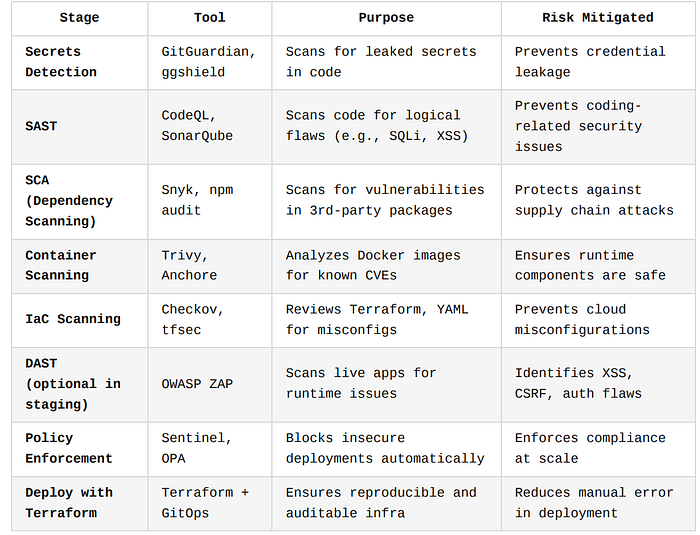
Explanation of Each Security Gate and Checkpoint
Let's break down the purpose and value of each step above:
Best Practices for Real-World Pipelines
- Fail Fast
- Stop the pipeline at the first critical issue.
- Saves time and avoids risk propagation.
2. Secrets as Environment Variables
- Never store secrets in plaintext.
- Use GitHub Secrets or Vault integrations.
3. Immutable Artifacts
- Tag artifacts with Git commit hash or build ID.
- Helps trace deployments and improve rollback strategies.
4. Security Dashboards
- Use platforms like GitLab, Azure DevOps, or external tools like Snyk and SonarQube to create dashboards.
- Centralize visibility for developers and security teams.
5. Audit Logging
- Ensure that all pipeline steps generate logs.
- Helps with compliance (e.g., SOC 2, ISO 27001) and breach investigations.
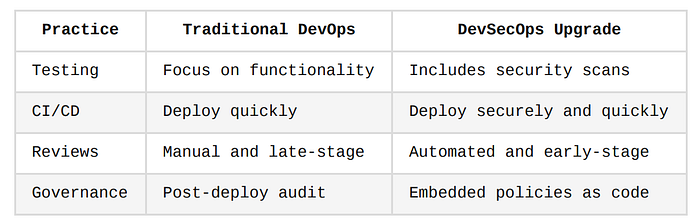
Summary: DevSecOps Pipeline Mindset
Culture and Process Considerations
While tools and pipelines are essential, DevSecOps is ultimately a cultural shift.
It demands more than just automation, it requires collaboration, shared responsibility, and a shift in mindset where everyone owns security.
This section addresses the human and process components that bring DevSecOps to life, covering training, roles, and measurement.
These aren't optional add-ons, they're core pillars of a secure development culture.
Developer Security Training
Why It Matters
Even the best tools can't compensate for insecure code written by unaware developers.
Training engineers to understand secure coding principles reduces vulnerabilities at the source, which is always cheaper and safer than fixing them downstream.
Training developers in secure coding is like training chefs in food safety. The kitchen may have the best equipment, but if the chef doesn't know how to prevent contamination, the dish could still be harmful.
1. Secure Coding Practices
Here are common categories where training makes an immediate impact:
- Input validation (avoid injection attacks)
- Authentication and session handling
- Secure file handling
- Cryptography basics
- Error handling without revealing system internals
Before and After Example (JavaScript)
// ❌ Insecure: prone to XSS
const username = req.query.name;
res.send(`<h1>Welcome ${username}</h1>`);

// ✅ Secure: escape or sanitize inputs
const escapeHTML = require('escape-html');
res.send(`<h1>Welcome ${escapeHTML(username)}</h1>`);
2. Tooling Know-How
Security training should also cover how to use the tools integrated in the CI/CD pipeline:
- Reading and interpreting Snyk or SonarQube reports
- Fixing issues flagged by OWASP ZAP
- Understanding IaC scan outputs from Checkov or tfsec
Many teams fail to act on scan results simply because developers don't understand the alerts. Training bridges that gap.
3. Training Approaches
- Workshops & Hackathons (e.g., capture-the-flag with vulnerable apps like Juice Shop)
- eLearning Platforms: Secure Code Warrior, Kontra, Pluralsight
- Code Review Roleplay: Simulate red-team/blue-team sessions during sprint retrospectives
Security Champions
What Is a Security Champion?
A Security Champion is a team member (typically a developer) who advocates for secure practices, helps bridge the gap between security and engineering teams, and serves as a first responder to security concerns within their squad.
Why It Works
- Localized expertise: Keeps security close to the code
- Scalability: Security teams are often outnumbered — champions scale influence across dev teams
- Faster feedback: Developers are more likely to raise concerns with a peer than with a separate audit team
Think of Security Champions as "fire marshals" in each team, they're not full-time firefighters, but they know how to handle a small fire before it spreads.
Key Responsibilities
- Act as the point of contact for DevSecOps within their team
- Review PRs for common security anti-patterns
- Facilitate threat modeling sessions
- Relay team challenges back to the central security team
How to Appoint and Support Them
- Select volunteers with strong development and communication skills
- Provide in-depth security training
- Give champions access to tooling dashboards
- Create a community of practice: internal Slack channels, monthly syncs, shared repositories
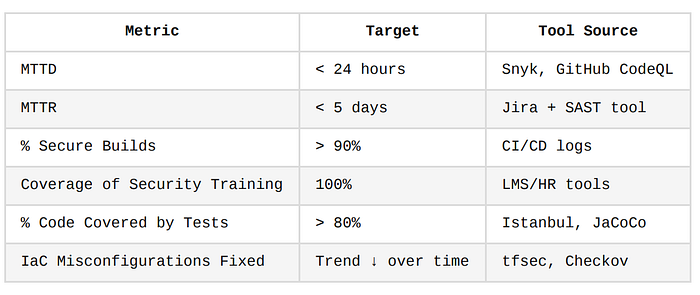
Metrics and KPIs
Without metrics, it's impossible to know if your DevSecOps program is improving.
Choose clear, actionable metrics that reflect security posture, developer productivity, and process maturity.
1. Mean Time to Detect (MTTD) Vulnerabilities
- Measures how quickly vulnerabilities are detected after being introduced into code.
- A shorter MTTD means faster visibility and tighter feedback loops.
How to Measure
Track from:
- Commit timestamp → first scan detection
- PR merge time → vulnerability identification
2. Mean Time to Remediate (MTTR)
- Time between vulnerability detection and resolution.
- A good MTTR reflects how efficient your team is at fixing issues.
Example
A Snyk report flags a CVE in Lodash. It is fixed in 2 days. That 48-hour window is your MTTR.
3. Percentage of Builds Passing Security Gates
- Tracks how many builds successfully pass all security scans without blocking issues.
Use Case
If only 40% of builds pass initially and that rises to 85% over two quarters, you've made real progress in security hygiene.
4. Code Coverage for Security Tests
- What percentage of your application code is exercised by unit, integration, and security-specific tests?
Tools
- Istanbul/nyc (for JS)
- JaCoCo (Java)
- pytest-cov (Python)
5. False Positive Rate of Scanners
- Measure how often automated tools flag non-issues that cause unnecessary work.
High false positives discourage developers from trusting the tools. Reducing this builds confidence.
6. Training Coverage and Frequency
- Track how many devs completed security training
- Log recurring training sessions and improvements in developer quiz scores
Suggested DevSecOps KPI Dashboard Fields
Bringing Culture and Metrics Together
To embed security into your engineering culture, focus on:
- Empowerment, not enforcement
- Collaboration, not compliance
- Continuous improvement, not one-off audits
Train your teams, assign local security champions, and measure progress with consistent KPIs.
This cultural maturity is what separates tool-using teams from true DevSecOps organizations.
Regulatory and Compliance Considerations
Modern software development doesn't operate in a vacuum, especially in industries such as finance, healthcare, and government.
Engineering teams are often required to comply with industry regulations and security standards.
DevSecOps not only helps organizations build secure applications but also simplifies regulatory compliance through automation, visibility, and traceability.
This section explores how DevSecOps practices map to popular frameworks like SOC 2, ISO 27001, NIST, and OWASP SAMM, and how teams can automate compliance-related tasks like evidence gathering and audit logging.
Mapping Security Steps to Compliance Frameworks
One of the biggest benefits of DevSecOps is that security controls are not just ad-hoc, they can directly satisfy requirements from various regulatory frameworks.
Below is a breakdown of how DevSecOps activities align with key compliance standards.
1. SOC 2 (System and Organization Controls 2)
SOC 2 focuses on the Trust Services Criteria: Security, Availability, Confidentiality, Processing Integrity, and Privacy.
It's commonly required for SaaS and cloud service providers.
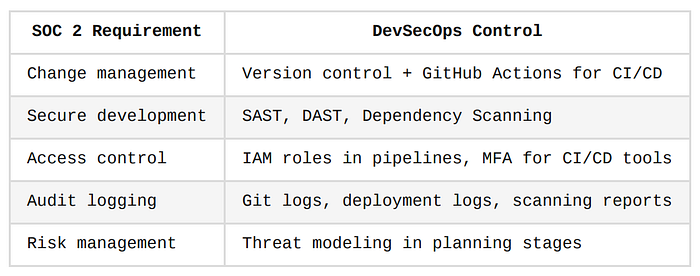
Think of SOC 2 like a quality certification for your digital restaurant. DevSecOps is the kitchen process that ensures cleanliness, traceability, and hygiene, with security baked in.
2. ISO/IEC 27001
This is an international standard for Information Security Management Systems (ISMS).
It emphasizes policies, risk assessments, and continual improvement.
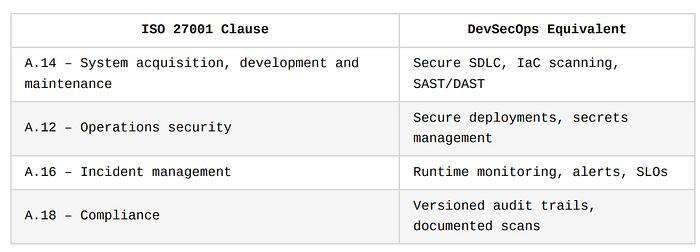
Key Practice
Use infrastructure-as-code (Terraform, Helm, Pulumi) + policy-as-code (OPA, Sentinel) to enforce rules automatically and generate logs for auditors.
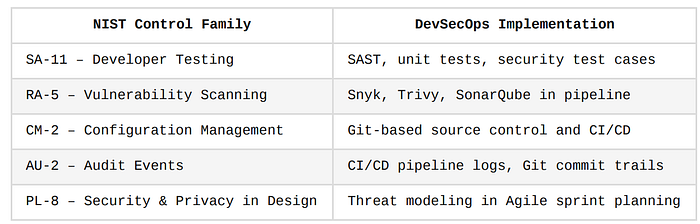
3. NIST SP 800–53 / 800–218 (Secure Software Development Framework)
NIST frameworks are widely used in U.S. federal and government-regulated industries.
4. OWASP SAMM (Software Assurance Maturity Model)
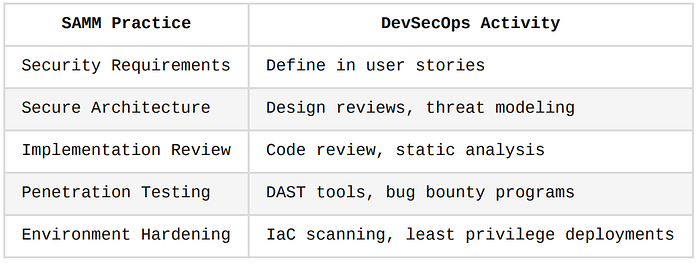
OWASP SAMM is a framework for assessing and improving software security practices.
It's not a compliance requirement but helps teams grow their maturity.
Automating Evidence Collection and Audit Trails
Auditors and assessors often ask: "Prove that your pipeline is secure, consistent, and compliant."
Manually gathering evidence is error-prone and time-consuming.
DevSecOps teams can solve this by building automated compliance telemetry into the CI/CD pipeline.
1. Version-Controlled Security Policies
All policies (e.g., for password length, S3 encryption, deployment access) should be codified and version-controlled.
OPA Policy Stored in Git
package terraform.policy

deny[msg] {
  input.resource == "aws_s3_bucket"
  input.config.public == true
  msg := "S3 buckets must not be public"
}
This code lives in Git, is reviewed through pull requests, and is traceable over time, perfect for audits.
2. Pipeline Artifacts as Evidence
Security tools used in CI/CD pipelines should output reports, logs, and dashboards that serve as audit artifacts.
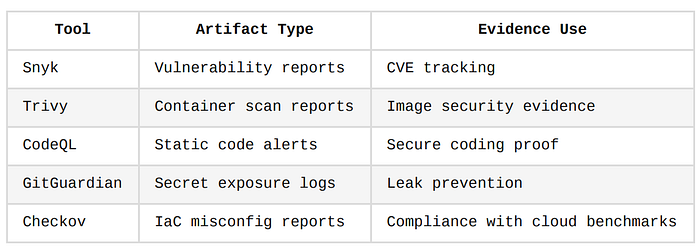
These artifacts can be stored in cloud buckets, SIEM tools, or artifact repositories like Artifactory or Nexus.
3. Centralized Logging and Monitoring
Pipeline executions, security alerts, and access logs should be shipped to a central logging system.
Examples
- AWS CloudWatch
- Azure Monitor
- ELK Stack (Elasticsearch, Logstash, Kibana)
- Splunk
These logs form a complete audit trail of who deployed what, when, where, and how.
4. Security Dashboards for Stakeholders
DevSecOps tools can expose visual dashboards with:
- Pass/fail rate for security gates
- Vulnerability trends over time
- Developer remediation metrics
- Pipeline compliance score
Tools
- GitLab Ultimate Security Dashboard
- Azure DevOps Security Insights
- SonarQube Enterprise
- Snyk Insights
These dashboards help security, audit, and compliance teams validate posture without deep technical involvement.
Automated Policy Gates
Use automation to enforce compliance controls before a release can proceed.
Blocking Deployments with Unscanned Artifacts
if: steps.trivy_scan.outcome != 'success'
  run: exit 1  # Fail build if image scan failed
Jenkins Declarative Policy
when {
  expression {
    return env.SECURITY_SCAN_STATUS == "PASS"
  }
}
This makes compliance proactive and automated, not reactive and manual.
6. Scheduled Compliance Scans
Not all compliance scans must be real-time. Schedule regular scans to catch drift, expired tokens, or non-compliant changes.
Tools for Scheduling
- Cron jobs in Jenkins or GitHub Actions
- Cloud-native automation (e.g., AWS Config Rules)
- Third-party compliance platforms like Wiz or Prisma Cloud
DevSecOps as a "Self-Updating Logbook"
Traditional compliance requires people keeping logs manually, like a paper logbook in a factory.
DevSecOps automates that logbook: every time a change is made, tested, scanned, and deployed, it's automatically logged, timestamped, and attributed, creating an immutable trail that auditors can trust.
Final Thoughts on Compliance in DevSecOps
- Compliance doesn't have to slow you down — with automation and Security-as-Code, it becomes a natural outcome of your development pipeline.
- Map your DevSecOps pipeline to the framework you must comply with.
- Automate audit evidence collection, and maintain dashboards to track your compliance posture over time.
- Use policy gates and centralized logs to ensure and prove that every release meets your organization's security expectations.
Challenges and Pitfalls in DevSecOps Adoption
Implementing DevSecOps is not just about plugging in new tools. It's a culture shift, a process upgrade, and a tooling overhaul, all happening simultaneously.
And like any transformation, there are common roadblocks.
In this section, we'll explore the most frequent challenges teams encounter when integrating security into their CI/CD workflows, and we'll provide strategic remedies backed by practical analogies.
False Positives Slowing Down Pipelines
The Problem
Security tools like SAST, DAST, and SCA often flag too many issues, including ones that are:
- Not exploitable
- Already mitigated by design
- Simply irrelevant (e.g., dev-only dependencies)
These false positives erode trust in the tools, overwhelm developers, and slow down delivery when every push or pull request triggers red alerts.
Imagine a smoke alarm in your kitchen that goes off every time you cook, even if there's no fire. Eventually, you'll start ignoring it, or disable it completely. That's what false positives do in security pipelines.
How to Solve It
- Tune the tools
- Most scanners allow configuration of:
🔹 Severity thresholds (e.g., block only on High or Critical issues)
🔹 Exclusion rules (ignore test folders, mock files)
🔹 Whitelisted findings (with justifications)
2. Triage and suppress intelligently
- Store justified suppressions in version control (e.g.,
.snyk-ignore,zap.conf,.sonarcloud.yml) - Link them to Jira tickets or internal documentation
3. Use baseline scans
- Focus only on new vulnerabilities introduced in each PR — not legacy code (many tools support this out of the box)
4. Educate developers
- Help them understand scanner output, so they don't get blocked by noise
- Create triage playbooks or cheat sheets
Tool Overload and Integration Friction
The Problem
In a bid to "shift left," teams sometimes stack too many tools:
- Snyk, Checkov, Trivy, SonarQube, GitGuardian, Aqua, OWASP ZAP, etc.
- Some tools overlap in functionality or produce conflicting results
- Pipelines become brittle, slower, and harder to maintain
Adding 10 different locks to your front door doesn't necessarily make your house safer, especially if you forget the keys, or if it takes so long to unlock them that you can't get in during an emergency.
How to Solve It
- Start small
- Begin with one scanner per stage:
🔹 SAST → CodeQL or SonarQube
🔹 SCA → Snyk or npm audit
🔹 IaC → tfsec or Checkov
🔹 Container → Trivy
- Add more only if needed based on maturity and audit demands
2. Centralize outputs
- Route all scanner results into a single dashboard (e.g., GitLab's security panel, or a custom ELK/Grafana setup)
- This simplifies triage and prioritization
3. Use orchestration tools
- Consider using orchestrators like:
- OWASP DefectDojo — for managing findings across tools
- Jenkins Shared Libraries or GitHub composite actions, to centralize logic
4. Automate tool health checks
- Add steps in your pipeline that test whether scanners are up, updated, and valid before execution
Lack of Alignment Between Security and Development Teams
The Problem
In traditional setups, security and development operate in silos.
Developers ship fast, while security audits after the fact.
In DevSecOps, this gap must close, but that doesn't happen magically.
Symptoms of misalignment include:
- Security imposing tools without developer input
- Developers seeing security as blockers
- Finger-pointing when incidents occur
It's like having an architect (security) and a builder (developer) working on the same building without ever talking. The builder finishes the house, and then the architect says the foundation is wrong, too late.
How to Solve It
- Involve developers in security decisions
- When choosing tools, settings, or policies — include the dev team
- Ask: Will this slow you down? Is the output understandable?
2. Adopt a shared responsibility model
- Security sets policies, baselines, and tooling
- Developers own the fixes, scan integrations, and code-level hygiene
3. Create cross-functional teams
- Assign Security Champions within dev squads (see the Culture and Process Considerations Section)
- Encourage bi-weekly security reviews with both dev and security members
4. Measure and incentivize security posture
- Highlight security improvements in sprint demos or retros
- Include vulnerability reduction or SLO adherence as part of engineering KPIs
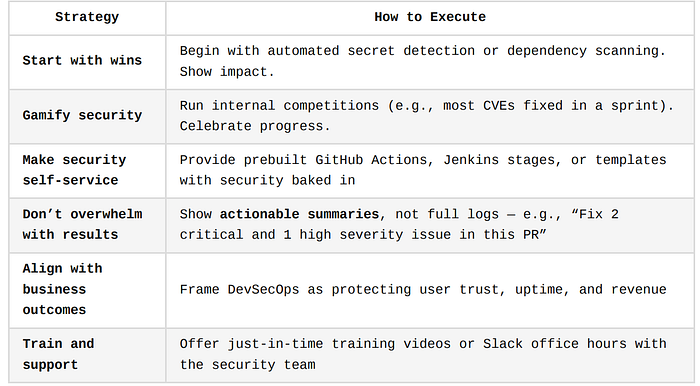
Strategies to Overcome Resistance
Resistance to DevSecOps often comes from fear, fatigue, or unfamiliarity. Devs worry about:
- Added cognitive load
- Tools slowing them down
- Public blame for security flaws
To win buy-in, you must make DevSecOps easier, not harder, and position it as a productivity and quality booster.
Practical Strategies
Mindset Shift: DevSecOps Is Not About Perfect Security
It's about building secure habits, shrinking attack surfaces incrementally, and making secure software the default output of every engineer and every pipeline.
Summary of Key Pitfalls and Remedies
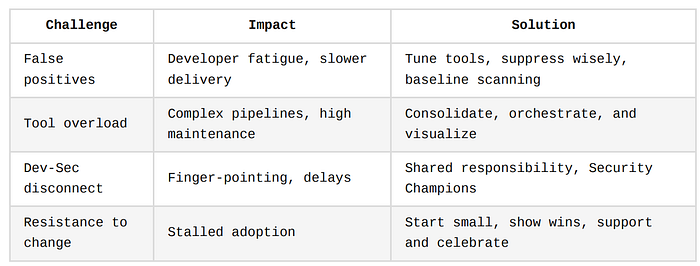
Case Studies and Success Stories
The best way to understand the tangible impact of DevSecOps is to study companies that have walked the path, across tech, banking, e-commerce, and healthcare.
In each story, we'll explore:
- The challenge
- The DevSecOps strategy
- The outcome
- And the metrics that matter
These stories emphasize that DevSecOps is not just theory, it delivers practical, measurable results in reducing risk, improving delivery speed, and achieving compliance at scale.
Netflix — Automating Security at the Speed of Streaming
Challenge
Netflix deploys code thousands of times per day across globally distributed microservices.
Manual security reviews and pre-release audits were slowing them down and couldn't scale with their delivery speed.
DevSecOps Approach
- Built automated security testing tools like Security Monkey (checks cloud configuration) and Lemur (manages TLS certificates).
- Integrated security checks as APIs that developers could call during build and deployment.
- Adopted "Paved Roads": opinionated, secure-by-default development paths backed by automation and tooling.
Results
- Security became self-service for developers.
- Engineers could deploy without waiting on the security team, while still meeting standards.
- Recovered engineering hours by automating routine checks and certificate rotation.
Imagine an airport where all baggage scans are done by robots on the conveyor belt. Passengers (developers) move faster through security because the checks are embedded in the flow, not added afterward.
Capital One — Financial Security at Cloud Scale
Challenge
Capital One moved to the cloud and needed to ensure compliance with strict financial regulations (e.g., PCI-DSS, SOC 2) while deploying frequently.
DevSecOps Approach
- Embedded SAST, DAST, and IaC scanning in all CI/CD pipelines.
- Built Cloud Custodian — a tool to automatically enforce security policies across AWS accounts.
- Made every code and infrastructure change traceable, auditable, and reversible via GitOps principles.
Results
- Achieved automated compliance evidence collection for audits.
- Reduced risk of data exposure with real-time misconfiguration alerts.
- Enabled developers to fix security issues before deployment, not after.
Metrics
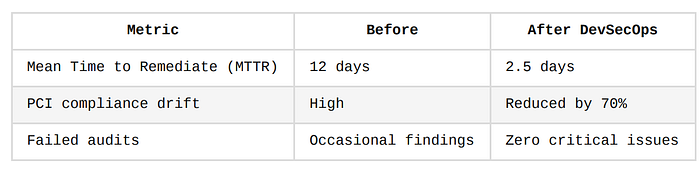
Adobe — Secure Delivery in a SaaS-Heavy Ecosystem
Challenge
With products like Creative Cloud and Adobe Sign, Adobe needed to deliver updates frequently while maintaining secure data handling across hundreds of cloud-based apps.
DevSecOps Approach
- Standardized CI/CD templates with built-in security stages across teams.
- Used tools like ThreadFix and Black Duck for vulnerability tracking and license compliance.
- Shifted from "gatekeeping" security to collaborative threat modeling and pre-commit scanning.
Results
- Developers began fixing vulnerabilities as part of normal development.
- Security became part of Agile sprint reviews.
- Gained real-time visibility into open CVEs in production services.
Shopify — Preventing Supply Chain Attacks at the Source
Challenge
Shopify relies heavily on open-source dependencies. The challenge was to identify and mitigate vulnerable libraries before they could compromise payment data or storefronts.
DevSecOps Approach
- Integrated automated Software Composition Analysis (SCA) into CI pipelines (using tools like Snyk).
- Built a developer security portal where engineers could self-diagnose, remediate, and learn.
- Adopted a "Fix First, Ask Later" approach: any critical security flag automatically halted the pipeline.
Results
- Reduced use of vulnerable packages by over 85% in 6 months.
- Developers now view security alerts like test failures — just another quality check.
- Strengthened supply chain integrity without delaying release velocity.
Healthcare.gov — Compliance-Driven DevSecOps
Challenge
Healthcare.gov operates under HIPAA, meaning it must ensure privacy, integrity, and availability of healthcare data.
Manual reviews and post-deployment security were insufficient.
DevSecOps Approach
- Integrated policy-as-code using tools like Open Policy Agent (OPA).
- Automated log aggregation, threat detection, and vulnerability management.
- Implemented container scanning and IaC validation using tools like Trivy and Checkov.
Results
- Shifted from quarterly audit cycles to continuous compliance.
- Reduced infrastructure misconfiguration rates by over 60%.
- Cut breach incident response time by half, thanks to integrated telemetry.
Cross-Company Observations
Across industries, the benefits of DevSecOps are consistently measurable:
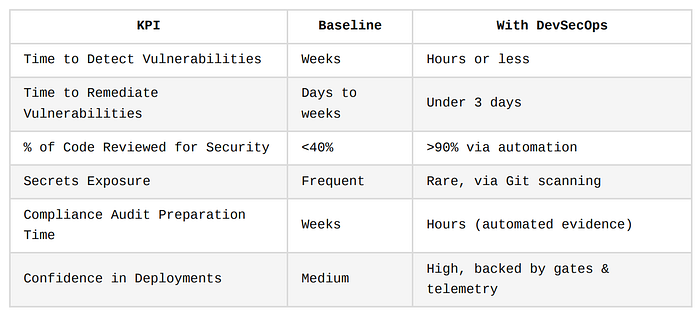
What These Successes Teach Us
- Security must scale with delivery
- High-performing teams prioritize secure defaults and self-service tools.
2. Automation is essential
- Manual security cannot keep up with modern CI/CD pipelines.
3. Security is a shared responsibility
- These companies didn't treat security as an isolated function — they distributed ownership to every developer.
4. Visibility drives accountability
- Dashboards, alerts, and logs help teams see what's insecure, and fix it fast.
DevSecOps as a "Seatbelt in a Race Car"
All these companies are moving at top speed — deploying multiple times a day, scaling across clouds.
DevSecOps acts like seatbelts and crash sensors in a Formula 1 car, you can still go fast, but you're protected from catastrophic failure.
And just like in F1, the technology is engineered in, not duct-taped on after the race begins.
Future of DevSecOps
DevSecOps is no longer a "nice to have." It's fast becoming a non-negotiable foundation in digital transformation initiatives across industries.
But the nature of threats, architectures, and engineering velocity is changing. So is DevSecOps.
This section focuses on three strategic directions shaping the future of DevSecOps:
- AI and Machine Learning-based security in pipelines
- Unified DevOps + SecOps observability platforms
- Zero Trust applied to CI/CD environments
AI/ML-based Security in Pipelines
Why It Matters
Traditional security tools rely on static signatures and rules — which can miss novel or polymorphic threats. With AI and ML, pipelines can:
- Detect unknown anomalies
- Predict risk trends
- Automate context-aware decision-making
This is especially powerful in large-scale environments, where thousands of builds and deployments happen daily.
Use Cases and Capabilities
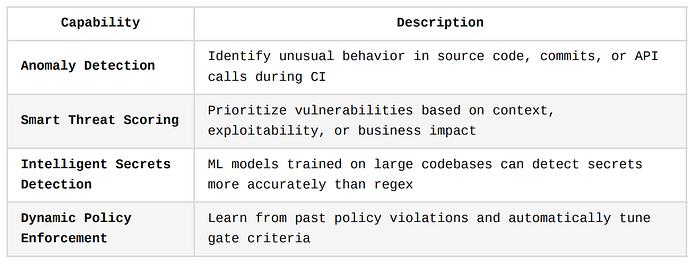
Examples in Practice
- GitHub's Copilot Security Feature Suggests secure code completions and warns developers in real-time when they're about to introduce an insecure pattern.
- Snyk AI Explains the root cause of a vulnerability and suggests a tailored fix using AI.
- ThreatML (Fictional Tool Concept) Imagine a plugin that monitors all builds, and flags any that differ in behavior from the historical norm, for example:
"This build touches IAM roles and modifies DNS routes. No recent builds from this repo have done that."
Think of AI in DevSecOps like an experienced chef watching over the kitchen. They won't just follow a recipe, they'll notice subtle signs of something being off: a different smell, unusual temperature, or missing ingredient, and alert the team before disaster strikes.
Challenges to Watch
- Model drift: ML models need retraining to stay relevant
- Bias and hallucinations: AI suggestions must be reviewed
- Data security: Logs and telemetry used to train AI must be anonymized
Unified DevOps + SecOps Observability Platforms
The Problem Today
- DevOps and security teams often rely on separate dashboards, tools, and logs.
- This leads to:
🔹 Siloed alerting
🔹 Missed attack signals
🔹 Slow mean time to respond (MTTR)
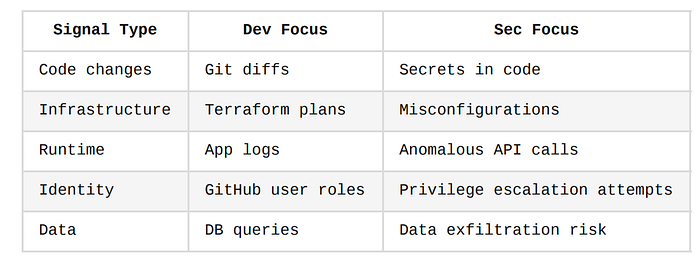
The Emerging Solution: Unified Observability
In the future, expect to see platforms that offer full-stack observability across development, deployment, and security, including:
Platform Trends
- Single-pane-of-glass Dashboards
- One unified interface for DevOps, SecOps, and Compliance
- Query logs across CI/CD, Kubernetes, cloud platforms, and runtime security tools
2. Security Observability-as-Code
- Teams define observability policies just like they define infrastructure
- Example: "Alert if a new Docker image is deployed without Trivy scan approval"
3. Shift from Logs to Events
- Instead of raw logs, platforms will analyze high-fidelity events for root cause identification
Examples of Emerging Tools
- Datadog Security Monitoring
- Splunk Observability Cloud
- New Relic with Pixie + Security Add-ons
- Elastic Security for Observability
- Aqua Platform (CI/CD + runtime)
What This Enables
- Faster triage: You can trace a breach from runtime → deployment → commit in seconds.
- Collaborative incident response: Developers and security teams investigate together, with shared visibility.
- Continuous auditability: Every event and action is traceable, versioned, and exportable.
Zero Trust CI/CD
Zero Trust 101
Zero Trust means: "Never trust, always verify." Every access request, whether human or machine, must be authenticated, authorized, and audited.
In the world of DevSecOps, Zero Trust is the future blueprint for securing every step of your software delivery pipeline.
Why CI/CD Needs Zero Trust
Modern pipelines:
- Pull in code from many contributors
- Use dozens of microservices
- Run in shared cloud infrastructure
- Rely on secrets and tokens to deploy
This makes them high-value targets for attackers. Breaches like SolarWinds, CodeCov, and CircleCI show how supply chain exploits can compromise thousands of customers.
Key Components of Zero Trust in CI/CD
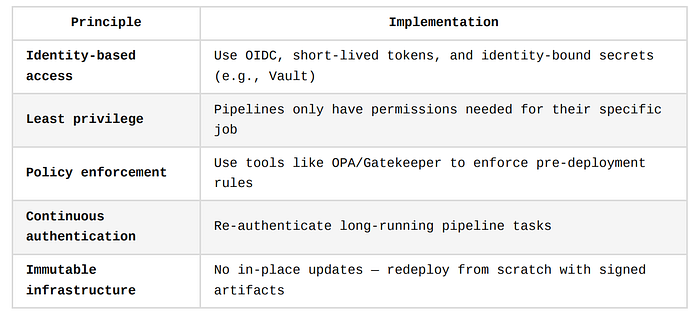
Tooling Trends
- SPIFFE/SPIRE for service identity within microservices
- GitHub OIDC tokens for secretless deployment
- Vault Agent Sidecar for ephemeral credentials
- Sigstore/Cosign for signed containers and artifacts
Think of Zero Trust like securing a modern bank:
- Employees can't just walk into the vault — they need biometric, time-based access
- Every dollar that moves is traced, signed, and verified
- Internal communications are monitored, encrypted, and logged
Now apply that to every pipeline, from pull request to production.
Benefits of Zero Trust Pipelines
- Blocks insider threats and lateral movement
- Enforces secure defaults (no hardcoded secrets or admin-wide roles)
- Enables safer collaboration with third parties and open-source
In Summary: The DevSecOps of Tomorrow
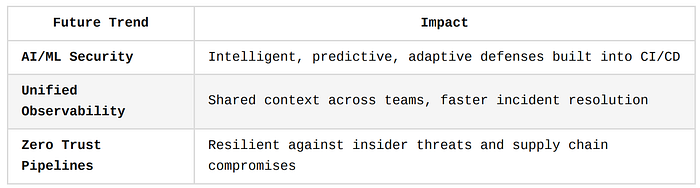
How to Prepare Now
- Begin collecting high-quality pipeline data — this is the fuel for ML-based security.
- Standardize logging and tracing across DevOps and security tools.
- Adopt least privilege and short-lived credentials in your pipelines today.
- Invest in upskilling your team on AI, policy-as-code, and Zero Trust principles.
Conclusion: Building a Culture of Secure Innovation
As organizations modernize their software delivery pipelines, the need to integrate security at every stage has never been more urgent.
This journey is not only about tools and policies, but about creating a mindset where security becomes an enabler of innovation, not a blocker.
This final section summarizes the core takeaways and encourages teams to take immediate, practical steps, building toward a sustainable DevSecOps culture.
1. Recap: Security Is a Shared Responsibility
Modern software delivery is faster, more collaborative, and more complex than ever, and with that speed and complexity comes increased risk.
In this environment, security can no longer be the last step in the process.
It must be embedded across the development lifecycle and owned by everyone: developers, DevOps engineers, architects, QA, and security professionals alike.
DevSecOps promotes a powerful cultural shift where:
- Developers understand and apply secure coding principles.
- DevOps engineers build resilient infrastructure with policy guardrails.
- Security teams serve as enablers, not gatekeepers, building platforms, templates, and automation to empower teams to move quickly and safely.
This shared responsibility model not only strengthens your security posture, it also fosters trust, agility, and long-term innovation.
2. Encourage Immediate Small Wins
Transformation doesn't happen overnight.
But you can start small today and see real results tomorrow.
Here are some high-impact, low-resistance wins you can pursue immediately:
✅ Integrate Static Application Security Testing (SAST)
- Use GitHub CodeQL, SonarQube, or Semgrep.
- Block critical vulnerabilities before they reach staging.
✅ Add Software Composition Analysis (SCA)
- Detect open-source vulnerabilities in packages using Snyk, OWASP Dependency-Check, or npm audit.
- Catch known CVEs and outdated libraries early.
✅ Set up Secrets Detection
- Use tools like GitGuardian or TruffleHog.
- Prevent credential leaks by scanning every commit and PR.
✅ Harden Infrastructure-as-Code (IaC)
- Add tfsec or Checkov to your Terraform or Kubernetes configs.
- Catch misconfigured resources and non-compliant cloud components.
✅ Establish Security Champions
- Assign a security-minded engineer in each squad to act as a first line of defense and evangelist.
These small steps will reduce risk immediately while building trust among developers, and momentum for deeper change.
3. Build Gradually Toward Full-Stack DevSecOps Maturity
Once small wins are delivering value, scale and deepen your practice using a maturity model approach.
You don't need to boil the ocean. Instead, treat security like technical debt, continuously improve over time through well-scoped sprints and investment cycles.
🔹 Beginner Maturity Stage
- Security tools are in place (SAST, SCA, secrets scanning)
- Manual reviews supported by basic CI/CD gates
- Vulnerabilities logged and reviewed sporadically
🔹 Intermediate Maturity Stage
- Security is integrated into every CI/CD pipeline
- Policy-as-code used to block non-compliant deployments
- Metrics and KPIs tracked (MTTR, % secure builds)
- Secure SDLC awareness embedded in sprint planning
🔹 Advanced Maturity Stage
- Real-time alerting and observability across SecOps + DevOps
- Zero Trust architecture for pipelines and deployment
- AI-enhanced security scanning and threat modeling
- Security is measurable, continuous, automated, and self-healing
4. Final Words: Secure, Ship, Scale, Without Compromise
DevSecOps is not just about securing your code, it's about enabling your teams to build fast, build smart, and build safely.
By embedding security into your pipelines, toolchains, workflows, and most importantly, your culture, you future-proof your delivery process against threats, audits, and disruptions.
Security is no longer a bottleneck or an afterthought, it is a core enabler of digital velocity.
Whether you're a solo developer pushing to GitHub, or an enterprise delivering hundreds of services across multiple clouds, the path to DevSecOps maturity is clear:
- Start simple and build momentum.
- Integrate, automate, and educate.
- Measure progress and celebrate improvements.
- Think ahead, AI, Zero Trust, and unified observability are the future.
Security is everyone's job. DevSecOps is how we get it done.
Additional Resources
No DevSecOps journey ends with a single implementation or article.
To build long-term capability and keep up with evolving best practices, teams must engage with the broader DevSecOps ecosystem, through models, hands-on platforms, books, and communities.
This section provides a categorized list of trusted, high-impact resources that cater to different learning styles and levels of experience, whether you're a beginner aiming to grasp fundamentals or a senior engineer driving enterprise transformation.
Frameworks and Maturity Models
These models help you assess where your team is today in its DevSecOps journey and define a clear roadmap for where you need to be.
1. OWASP DevSecOps Maturity Model (DSOMM)
The DSOMM offers a comprehensive, vendor-neutral framework for evaluating your security posture across:
- Source Code
- Build Pipelines
- Deployments
- Runtime environments
It uses a tiered maturity scale (e.g., Beginner, Intermediate, Expert) for each domain, allowing teams to:
- Identify gaps
- Benchmark progress
- Prioritize improvements
Use case:
Planning a roadmap to go from ad hoc security scanning to fully automated, policy-enforced pipelines.
2. Software Assurance Maturity Model (SAMM) by OWASP
Though broader than just CI/CD, SAMM is useful for security architecture, governance, and software assurance at the organizational level.
Core Benefit: Aligns DevSecOps initiatives with executive and compliance goals.
Hands-On Labs and Training Platforms
These platforms are essential for building muscle memory, experimenting in safe sandboxes, and upskilling teams via simulations and scenarios.
1. Katacoda (by O'Reilly)
A free, browser-based platform with interactive scenarios on:
- Kubernetes Security
- CI/CD pipelines with Jenkins or GitHub Actions
- Infrastructure as Code security (Terraform, Helm)
- Real-world DevOps pipelines
No installation required. Learn by doing.
Example lab:
"Build a secure GitOps pipeline with policy gates using OPA and Gatekeeper."
2. Secure Code Warrior
🌐 https://securecodewarrior.com
An interactive learning platform focused on secure coding skills across:
- JavaScript, Python, Java, C#, Go, and more
- OWASP Top 10 vulnerabilities
- CI/CD awareness
Great for developers and security champions looking to bridge the knowledge gap between coding and risk.
Bonus: Tracks team progress and offers competitions like "Secure Coding Tournaments."
3. Play With Docker / Play With Kubernetes
🌐 https://labs.play-with-docker.com 🌐 https://labs.play-with-k8s.com
Free online playgrounds to simulate:
- Docker builds with security scans (e.g., Trivy)
- Kubernetes clusters with runtime security agents
- Cloud-native security challenges
Books for Deep Understanding
Books are an excellent way to build foundational knowledge, leadership perspectives, and architectural strategies.
1. The DevOps Handbook
📘 By Gene Kim, Jez Humble, Patrick Debois, and John Willis A modern classic that covers:
- CI/CD at scale
- Automation principles
- Culture and collaboration models
💡 Includes a dedicated section on "Integrating Information Security into DevOps", offering real-world examples.
2. Securing DevOps: Security in the Cloud
📘 By Julien Vehent (Mozilla) One of the most practical, tool-heavy books for engineers.
Topics include:
- Threat modeling pipelines
- Secrets management
- TLS, SSH, JWT best practices
- Runtime hardening in Docker and AWS
🔥 Ideal for hands-on DevOps professionals responsible for securing deployments.
3. Building a Modern Security Program
📘 By Jennifer Minella Covers how to build a developer-friendly security program with a DevSecOps mindset.
Useful for:
- CISOs, Engineering Managers, and Security Champions
- Teams scaling DevSecOps in regulated environments
DevSecOps Communities and Collaboration Hubs
You don't have to walk the DevSecOps path alone.
Join active communities to ask questions, learn from others' mistakes, and share success stories.
1. DevSecOps.org
A long-standing hub offering:
- Whitepapers and templates
- Security automation guides
- Recorded talks from industry leaders
Includes free resources on:
- Secure Jenkins pipelines
- Threat modeling for microservices
- Automating compliance evidence
2. OWASP Slack Community
📨 https://owasp.org/slack/invite
OWASP's Slack offers multiple channels on:
- DSOMM
- SAMM
- SCA, SAST, DAST
- Secure CI/CD
You'll find:
- Tool authors and core contributors
- Real-world practitioners
- Open-source maintainers
Great for real-time help, tool questions, and emerging threat discussions.
3. Reddit: r/devsecops & r/devops
🗣 Community-driven advice, tool comparisons, and implementation horror stories.
Search or post questions like:
"Has anyone successfully integrated Snyk into Bitbucket Pipelines with approval gates?"
4. Discord: DevSecOps Foundation
Find practitioner circles discussing:
- GitHub Actions for compliance
- Kubernetes security
- Secrets detection case studies
- Integrating Open Policy Agent (OPA) in CI/CD
Bonus: Tools for Your DevSecOps Toolbox
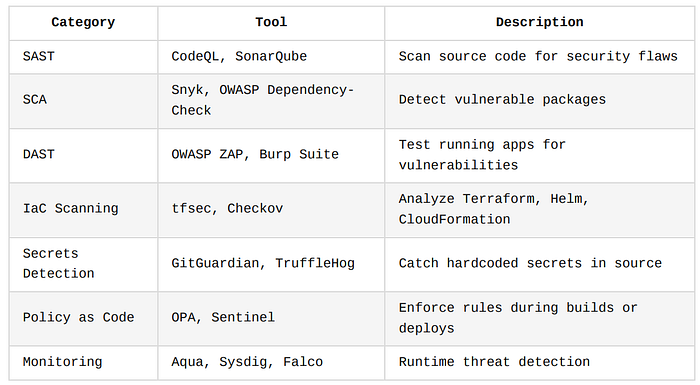
Final Thought
The most secure teams are the ones who never stop learning, collaborating, and experimenting.
Whether you're building your first CI/CD pipeline or leading a multi-cloud transformation, these resources will:
- Ground your decisions in best practices
- Empower your teams with practical tools
- Connect you to a global community of DevSecOps engineers and advocates