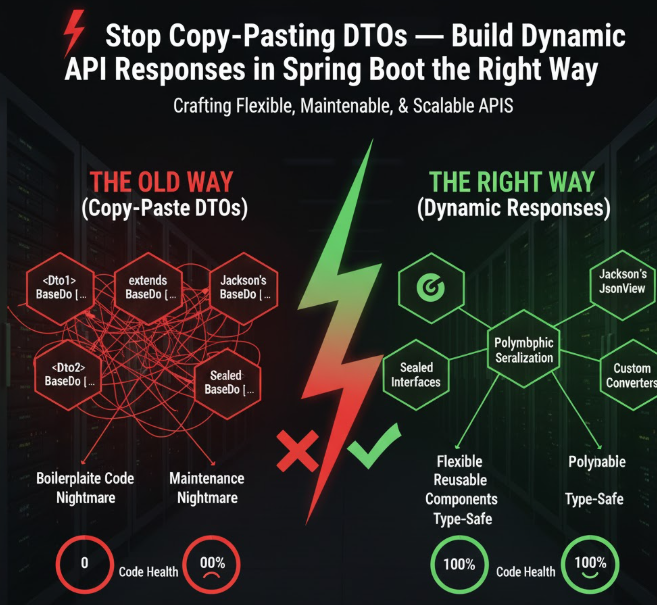

🚀 Stop Hardcoding DTOs: Build Smart, Dynamic JSON Responses in Spring Boot
"Can this API return a different response based on the user's role?"
"Sometimes we send full details, sometimes just a summary."
If you've ever heard that during a code review, you know the pain.
Here's how to build flexible yet type-safe dynamic responses in Spring Boot — no hacks, no chaos, just clean design.
💡 The Problem: When One Response Doesn't Fit All
Let's say you have a simple endpoint:
@GetMapping("/user/{id}")
public UserResponse getUser(@PathVariable Long id) {
    return userService.getUser(id);
}
Now product comes along and says:
- Admins should see full user details
- Regular users should only see public info
- Premium users should see some extras
…and suddenly your clean endpoint needs three different response shapes 😩
You could create:
UserBasicResponse, UserPremiumResponse, UserAdminResponseBut that's messy, repetitive, and breaks maintainability.
🚀 The Solution: Dynamic, Context-Aware JSON Responses
Spring Boot + Jackson gives you multiple elegant ways to handle this, depending on your flexibility needs.
We'll explore:
- 🧩 Polymorphic Response Classes (
@JsonTypeInfo) - 🪄 Conditional Fields with Jackson Views
- 🧠 Runtime Response Shaping using
MaporJsonNode
🧩 1. Polymorphic Responses with @JsonTypeInfo
Let's define a base response and extend it for specific cases.
🧠 Base Class
@JsonTypeInfo(use = JsonTypeInfo.Id.NAME, include = JsonTypeInfo.As.EXISTING_PROPERTY, property = "type")
@JsonSubTypes({
    @JsonSubTypes.Type(value = UserBasicResponse.class, name = "basic"),
    @JsonSubTypes.Type(value = UserPremiumResponse.class, name = "premium"),
    @JsonSubTypes.Type(value = UserAdminResponse.class, name = "admin")
})
public abstract class UserResponse {
    public String type;
}
🧩 Subclasses
@Data
@NoArgsConstructor
@AllArgsConstructor
public class UserBasicResponse extends UserResponse {
    private String name;
    private String email;
}
@Data
@NoArgsConstructor
@AllArgsConstructor
public class UserPremiumResponse extends UserResponse {
    private String name;
    private String email;
    private String subscription;
}
@Data
@NoArgsConstructor
@AllArgsConstructor
public class UserAdminResponse extends UserResponse {
    private String name;
    private String email;
    private String role;
    private List<String> permissions;
}
🧠 Controller
@GetMapping("/{id}")
public UserResponse getUser(@PathVariable Long id, @RequestParam String role) {
    return switch (role) {
        case "admin" -> new UserAdminResponse("Alice", "[email protected]", "ADMIN", List.of("DELETE", "UPDATE"));
        case "premium" -> new UserPremiumResponse("Bob", "[email protected]", "PREMIUM");
        default -> new UserBasicResponse("Charlie", "[email protected]");
    };
}
✅ Output:
For role=basic
{
  "type": "basic",
  "name": "Charlie",
  "email": "[email protected]"
}
For role=admin
{
  "type": "admin",
  "name": "Alice",
  "email": "[email protected]",
  "role": "ADMIN",
  "permissions": ["DELETE", "UPDATE"]
}
💥 Clean, maintainable, and type-safe.
🪄 2. Conditional Fields Using Jackson Views
If you want to keep a single DTO but expose fields conditionally, use Jackson Views.
Define Views
public class Views {
    public interface Public {}
    public interface Premium extends Public {}
    public interface Admin extends Premium {}
}
Annotate Fields
@Data
public class UserView {
    @JsonView(Views.Public.class)
    private String name;
@JsonView(Views.Public.class)
    private String email;
    @JsonView(Views.Premium.class)
    private String subscription;
    @JsonView(Views.Admin.class)
    private List<String> permissions;
}
Controller with Views
@GetMapping("/view/{id}")
@JsonView(Views.Public.class)
public UserView getUserPublic(@PathVariable Long id) {
    return getMockUser();
}
@GetMapping("/view/premium/{id}")
@JsonView(Views.Premium.class)
public UserView getUserPremium(@PathVariable Long id) {
    return getMockUser();
}
@GetMapping("/view/admin/{id}")
@JsonView(Views.Admin.class)
public UserView getUserAdmin(@PathVariable Long id) {
    return getMockUser();
}
private UserView getMockUser() {
    UserView user = new UserView();
    user.setName("Alice");
    user.setEmail("[email protected]");
    user.setSubscription("Gold");
    user.setPermissions(List.of("DELETE", "UPDATE"));
    return user;
}
✅ Automatically returns only the fields relevant to the view.
🧠 3. Fully Dynamic Responses with Map or JsonNode
For APIs that depend heavily on runtime conditions (e.g. feature flags, plugins, third-party integrations), you can return dynamic maps.
@GetMapping("/dynamic")
public ResponseEntity<Map<String, Object>> getDynamicResponse(@RequestParam String mode) {
    Map<String, Object> response = new LinkedHashMap<>();
    response.put("timestamp", LocalDateTime.now());
    response.put("status", "ok");
if ("compact".equals(mode)) {
        response.put("data", Map.of("message", "Minimal response"));
    } else if ("detailed".equals(mode)) {
        response.put("data", Map.of("user", "Alice", "features", List.of("A", "B", "C")));
    }
    return ResponseEntity.ok(response);
}
Or even with JsonNode for structured flexibility:
@Autowired
private ObjectMapper mapper;
@GetMapping("/jsonnode")
public JsonNode getJsonNodeResponse(@RequestParam String type) {
    ObjectNode node = mapper.createObjectNode();
    node.put("type", type);
    node.put("timestamp", System.currentTimeMillis());
    node.putPOJO("data", Map.of("user", "Bob", "role", type));
    return node;
}
✅ Perfect for:
- Webhooks
- Config-driven APIs
- Multi-tenant backends
⚡ Pro Tip: Wrap Everything in a Unified Response
Even when returning dynamic shapes, always wrap in a consistent structure:
@Data
@AllArgsConstructor
@NoArgsConstructor
public class ApiResponse<T> {
    private boolean success;
    private T data;
    private String message;
}
Now you can safely return any dynamic data type:
@GetMapping("/safe")
public ApiResponse<Object> getSafeResponse(@RequestParam String type) {
    if ("admin".equals(type)) {
        return new ApiResponse<>(true, Map.of("role", "ADMIN", "permissions", List.of("READ", "WRITE")), "Admin data");
    }
    return new ApiResponse<>(true, Map.of("user", "Guest"), "Basic data");
}
Consistent ✅ Type-safe ✅ Frontend-friendly ✅
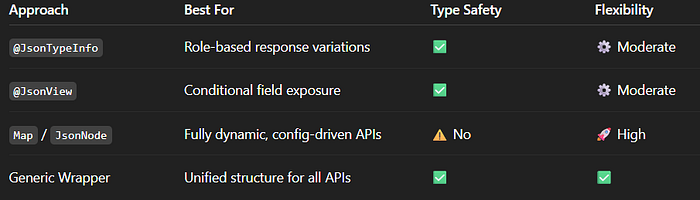
📊 TL;DR
💬 Final Thoughts
Dynamic response structures don't have to turn your API into spaghetti. Spring Boot gives you all the tools you need to build context-aware, type-safe, and maintainable dynamic APIs.
The key is balance: flexibility without losing clarity.
So next time someone says:
"We want the same endpoint to return different shapes…"
You just grin and say:
"Handled 😎R.&qut;